Teams
Blackout dates · Allowed days and times · Travel windows by division · Preferred scheduling windows · Division assignments and team moves
Regular season, playoffs and tournaments — teams, surfaces, practices, travel, blackouts and rules solved together in minutes, and re-planned when the season changes. SportsPlanr sits above the platforms your member associations already publish on.
“U11 teams must not play after 9:00 PM.”
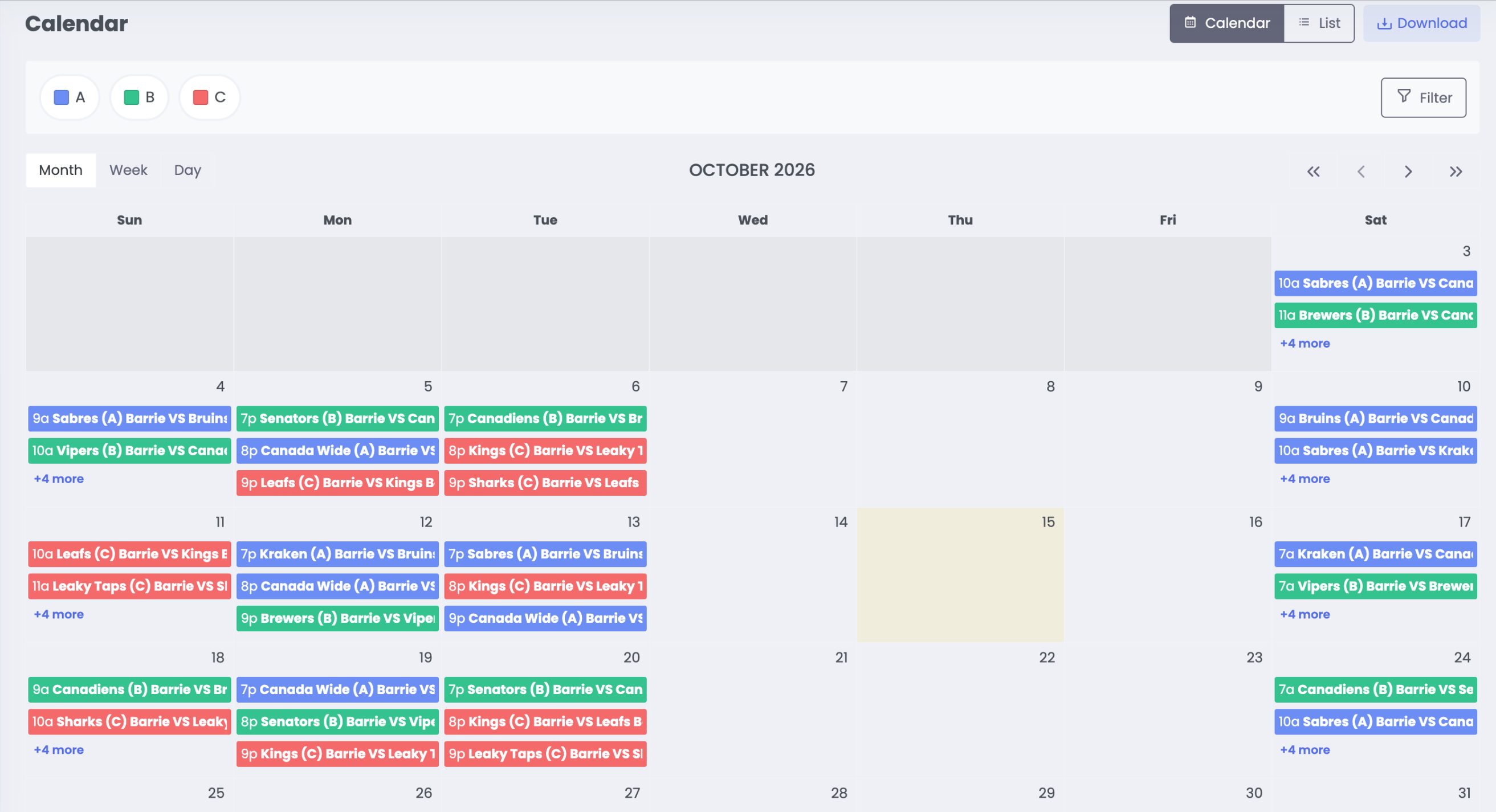
Define your league's rules, requirements, teams, facilities and surfaces, and available time in plain language. A Spot Check automatically checks whether your rules and requirements can still produce a feasible schedule — before you generate anything.
“U11 teams must not play after 9:00 PM.”
“Add a second surface at the Barrie facility.”
“U15 teams should play at least 20 games.”
“Actually, U11 teams can't play after 7:00 PM.”
Tighten a rule too far and SportsPlanr says so straight away — then suggests changes that may help make it work. You find out while you're still setting things up, not after the schedule is published to your league.
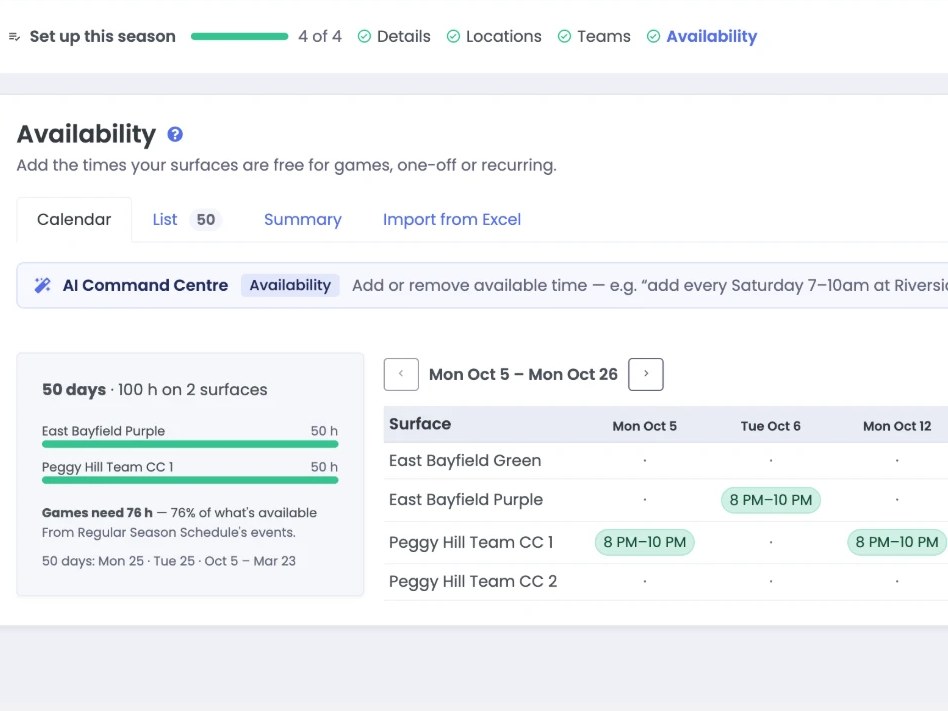
Before a single game is placed, SportsPlanr tells you whether the dates and surfaces you have can hold the games you've promised.
Not Just Matchups. The Whole Scheduling Problem.
A real league isn't a list of independent games. Teams, divisions, facilities, practices, travel, availability, fairness, and scheduling rules all compete for the same limited resources — and every one of them constrains the others.
All of these conditions are considered together.
Any one of them is easy on its own. It's the interaction between them that makes real scheduling hard — so SportsPlanr weighs them as a single problem to decide whether a workable schedule is possible, and to find one when it is.
Blackout dates · Allowed days and times · Travel windows by division · Preferred scheduling windows · Division assignments and team moves
Available time blocks · Surfaces shared across divisions · Availability by surface, event type, and geography · Predefined games and practices
Home and away balance · Fairness across teams · Even start and end times · Days between events · Equal travel loads
Games · Practices · Playoffs · Cross-division tournament and bracket scheduling
An away game isn't just a matchup — it's a trip to another centre. Each division sets the days and times its teams are able to travel, and away games are placed inside those windows.
U14 Barrie Orillia
Saturday · 7:00 PM
Inside the division's travel window
Practices aren't scheduled after the games are done. They compete for the same surfaces and the same available time, so they're placed together.
Saturday
Surface 1
Surface 2
Teams · Divisions · Facilities & surfaces · Available time · Practices · Travel · Blackouts · Fairness · Rules
Re-check in seconds, regenerate in minutes, clone a configuration to reuse it next season, and export the finished schedule to your other systems.
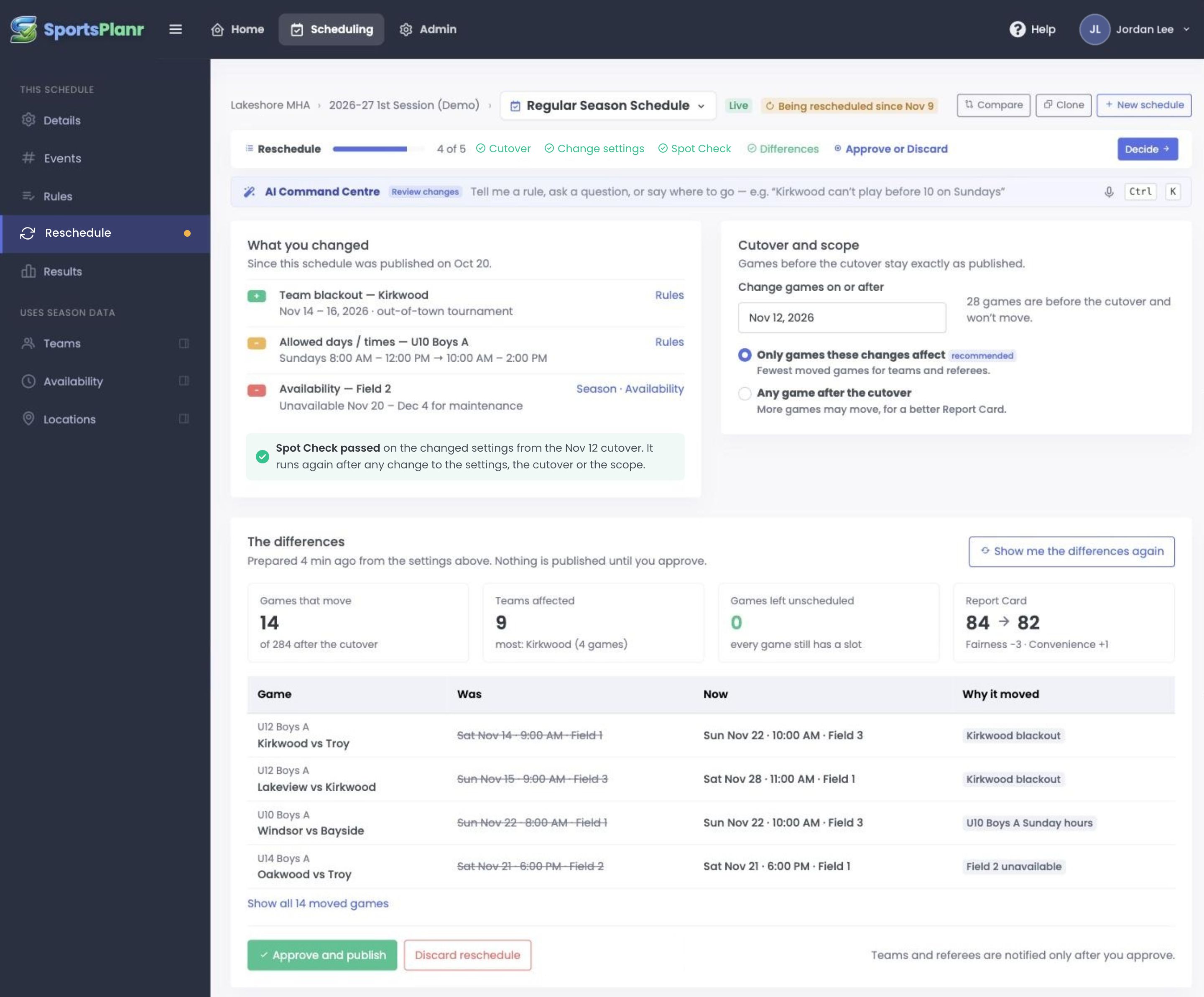
Mid-season, things happen that nobody planned for. A storm wipes out a weekend. A venue closes. A field goes down, a team changes divisions, a club asks for a different night. The schedule has to change — and only the games that have to move should move, without rebuilding the season.
That was the problem. These are the capabilities that solve it — you describe what your league needs in plain language, the scheduling engine solves it.
Full-season schedules in minutes instead of weeks — constraints, surfaces, and availability handled together.
Every rule change is checked automatically. When the rules can't work, you get suggestions.
Configure rules, requirements, teams, surfaces, and availability in plain language. You confirm every change.
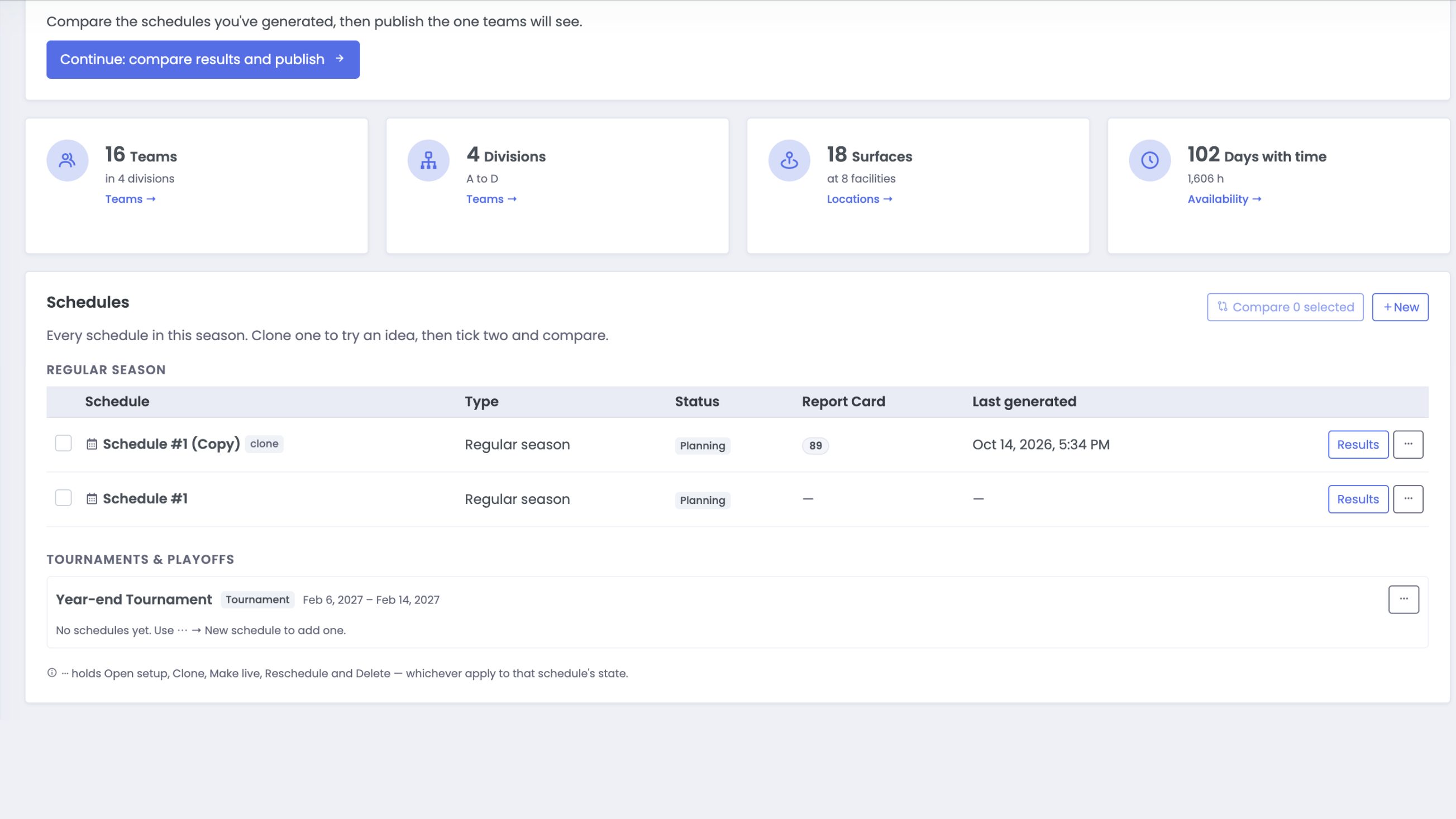
Build several workable schedules for one season; publish the best.
A team moves, a surface drops out, a date changes. Only the affected games are re-planned, and you review the diff before it goes live.
Blackouts, allowed days and times, travel limits, and fairness — by team, division, surface, and event. Divisions aren't solved in isolation: they share surfaces and compete for the same available time.
Plain language makes the complexity easy to express. The scheduling engine does the hard solving.
Set up your season once, then build and compare as many schedules as you need.
Your teams, surfaces, and availability — the season set up once — then each schedule’s required and preferred rules.
Every change is automatically checked for feasibility. A Spot Check tells you when rules can’t work, and offers suggestions.
The scheduling engine solves the whole league together. Copy a regular-season schedule to compare options.
A surface or team changes mid-season? Only the games that have to move are re-planned; everything already played stays put.
Every schedule gets a report card, so you can judge its quality before you publish it — and build more than one option to choose from.
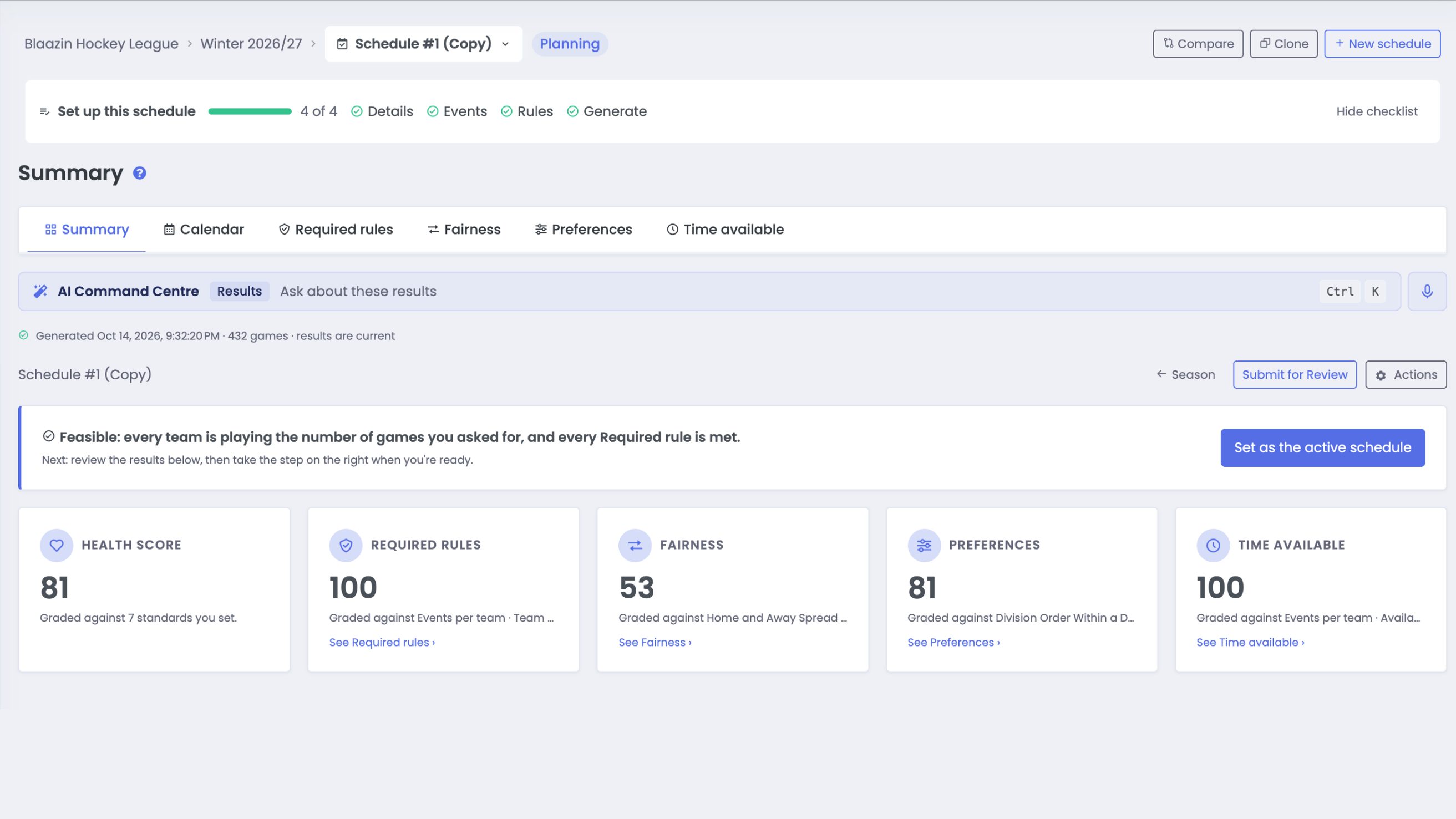
The Command Centre keeps working after the schedule is built. Ask questions about it in plain language — and change it as the season unfolds.
“What is the average start time for teams in the U7 division?”
Surfaces, teams, divisions, available time, new rules — say what changed and SportsPlanr re-checks that the schedule still works.
SportsPlanr is sports league scheduling software for the people who own the season calendar — and who hear about it first when something doesn't work.
Plan seasons with confidence and fewer scheduling revisions.
Define constraints, generate schedules, and manage changes quickly.
Build round-robin, playoff, and tournament schedules.
The season doesn't live in one volunteer's head or one spreadsheet. Anyone with the login can rebuild it, change it, and prove it was built to the rules. Priced per organization and published on this page — never per player, per game or per surface — so you know what growth costs before you grow.
Our scheduling engine has solved complex multi-city league logistics since 2018 — balancing games, practices, travel, and contended venue time across dozens of sites. Built on top of that proven engine, our modern web platform gives league administrators complete control to build, run, and adjust entire season schedules independently.
We first used SportsPlanr for the 2025–26 SMGHL season, managing a schedule for nearly 60 teams across five leagues, and the time savings were incredible.
The platform made a very complex process much easier, particularly when managing team blackouts and ice allocations across dozens of arenas. We also had countless hard and soft rules to account for, from tournament blackouts to prioritizing earlier game times for younger age groups and later times for older teams, and SportsPlanr handled them seamlessly.
Randy and his team were fantastic to work with. They were responsive, helpful and always willing to support us whenever needed.
Hands down, I would use SportsPlanr again.
SportsPlanr replaces weeks of volunteer scheduling work each season. One annual subscription covers your whole organization — every league, division, and program — so your administrators spend their time on members instead of spreadsheets.
Your organization's billing currency is set from its address when you sign up.
For organizations that publish schedules through their own channels. You get the full scheduling engine; you handle distribution.
Annual base price range
$1,000–$4,500 CAD per year
For organizations that want both: SportsPlanr produces the schedule and hosts the public site where members access it.
Annual base price range
$1,600–$6,500 CAD per year
Priced by team count and seasons — never per player, per game or per surface.
Final price depends on your team count and number of seasons per year. Use the estimator below for your number.
Enter your team count, seasons per year, and plan to see an estimated annual price.
Limited Founding Member spaces available.
Founding Members receive a first-year discount, one complimentary Onboarding Assist Session, and permanent priority access to new modules at release — typically 30 days before general availability.
Contact us to learn whether your organization qualifies.
Common questions about SportsPlanr scheduling, setup, and pricing.
SportsPlanr is sport-agnostic. It works for any sport that uses seasons, divisions, teams, and surfaces — hockey, soccer, basketball, volleyball, and more. The scheduling engine applies your rules and constraints regardless of sport type.
Most organizations generate a complete schedule in minutes, and re-check a rule change in seconds. Once your teams, surfaces, and constraints are configured, the engine produces an optimized schedule ready for review and publishing. Subsequent seasons are even faster using cloned settings.
A Spot Check is a quick feasibility check: it tells you whether your scheduling rules and requirements can actually produce a result before you run a full generation. It runs automatically when you change the scheduling rules or requirements and reports whether they are feasible or not feasible — and when they’re not feasible, contextual AI-generated suggestions point you to what to adjust. Starting from a simple, least-restrictive schedule and watching the Spot Check as you tighten the rules means conflicts show up in seconds, so you never over-invest in generating a schedule that was never going to work.
Yes. SportsPlanr gives you full editorial control after generation. You can move individual games, adjust surfaces, and edit matchups. If you change the scheduling rules or requirements themselves, a Spot Check re-runs automatically so you know they are still feasible before you generate again.
Yes. There's an AI assistant on every screen. Across season setup, scheduling rules, scenarios, schedule review, and admin, you can describe what you want in plain language — for example, "add U10 and U12 divisions" or "block the holiday weekend for the Squirt division." The assistant turns your request into a set of proposed changes, which you review and confirm before anything is applied. You can still do everything with the regular forms; chatting is just a faster path.
No. The assistant only proposes changes — it never applies them automatically. You see a clear summary of exactly what will change and confirm it first, and it only proposes actions you have permission to perform. Nothing is saved until you approve it.
Tournament scheduling uses the same generation pipeline as a regular season, with bracket-specific logic layered on top. SportsPlanr handles bracket structure, seeding, round-robin group play, and game progression automatically. Manual controls are available for final adjustments.
Playoffs use seeded matchups, configurable series formats, and progression-aware structure, so the schedule adapts as teams advance. You get the same generation speed with additional logic specific to playoff structure, while retaining manual control at the game level.
Yes. SportsPlanr supports multiple leagues — rep, house, and recreational divisions — within one platform. Resources like surfaces can be shared across leagues, and all scheduling is managed from a single workflow.
Both plans include the full scheduling engine — regular season, tournament, and playoff generation. Scheduling lets you export schedules into your existing website or communication tools. Scheduling + Hosting adds a public-facing schedule website hosted by SportsPlanr.
Mark the live schedule for a change, say what changed — a team moved divisions, a surface is closed, a club's availability shifted — and choose the date it takes effect. Everything before that date stays exactly as played. Only the remaining games that have to move are re-planned, with every rule still applied, and you see each one — where it was, where it is now — before anything is published. Individual games can also be edited by hand at any time.
Self-serve onboarding materials and email support are included with every plan. For hands-on help during initial setup, an optional Onboarding Assist Session is available as a one-time add-on, priced by team tier and confirmed during your consultation.
Fastbreak AI is a tournament-operations platform, monetised on registration fees. SportsPlanr is season scheduling — placing a whole league's games and practices against shared venues, travel and availability, in any sport. Two differences decide it: Fastbreak does not model leagues that pool teams across member associations, or the eligibility rules a governing body imposes where one applies; and SportsPlanr's pricing is a published annual subscription — the rates are on this page — not a per-registration service fee. If you run tournaments as a business, they are the better fit. If you own a season calendar, we are.
SportsPlanr bills in CAD, USD or EUR. Your organization's currency is set when it's created, from its location: EUR in eurozone countries, CAD in Canada, USD everywhere else. Prices on this page are listed in CAD, and you can change that above. Billing is annual.
The first step is a 30-minute demo with your management team and lead scheduler. We walk through the platform, understand your scheduling needs, and provide a tailored quote with a clear launch timeline.
Bring us your teams, surfaces, rules, and the scheduling headaches you deal with every season. We'll show you how SportsPlanr would handle them.
A focused 30-minute walkthrough with your management team and lead scheduler — no obligation.